museaicode.cc

Muse AI Code · Community invite board

Share Muse AI invite codes

Redeem a code and get 1 billion free Muse tokens — or share yours and earn more every time it's used. Community votes help the working codes rise to the top.

23 live codesHow to redeem a code →

Share your code, earn tokens

Every time someone redeems your invite code, you both get 1 billion Muse tokens. Post it here and let the community put it to work.

Tip: you can paste Muse's whole invite message — we'll find the code.

23 invite codes

Ranked by votes and freshness — newest working codes first.

Showing 1–23 of 23

  1. #1100% say it works
    VV4RQE
  2. #2100% say it works
    BOAA1N
  3. #3100% say it works
    MLADWD
  4. #4100% say it works
    8H32RB

    Shared on NodeLoc

  5. #5
    ADK1N2

    Shared on NodeLoc

  6. #6
    TUGWZN

    Shared on NodeLoc

  7. #7
    LYFGH6

    Shared on NodeLoc

  8. #8
    6CR27L

    Shared on NodeSeek

  9. #9
    R6P3KL

    Shared on NodeLoc

  10. #10
    EPZZX6

    Shared on NodeSeek

  11. #11
    BJE152

    Shared on NodeLoc

  12. #12
    HDZN87

    Shared on NodeSeek

  13. #13
    ECG55F

    Shared on NodeSeek

  14. #14
    2DOX6H

    Shared on NodeSeek

  15. #15
    0ACQ7E

    Shared on NodeSeek

  16. #16
    ZREPBO

    Shared on NodeSeek

  17. #17
    ZGMX09

    Shared on NodeLoc

  18. #18
    CTAWTG

    Shared on NodeSeek

  19. #19
    9CVSRD

    Shared on NodeSeek

  20. #20
    7XZU8F

    Shared on NodeSeek

  21. #21
    NPW1YI

    Shared on NodeSeek

  22. #22
    7PIGBT

    Shared on NodeSeek

  23. #23
    DFJ2BQ

    Shared on NodeSeek

FAQ

Questions about invite codes

How do I use a Muse invite code?
  1. 1Create a Muse account at muse.ai.
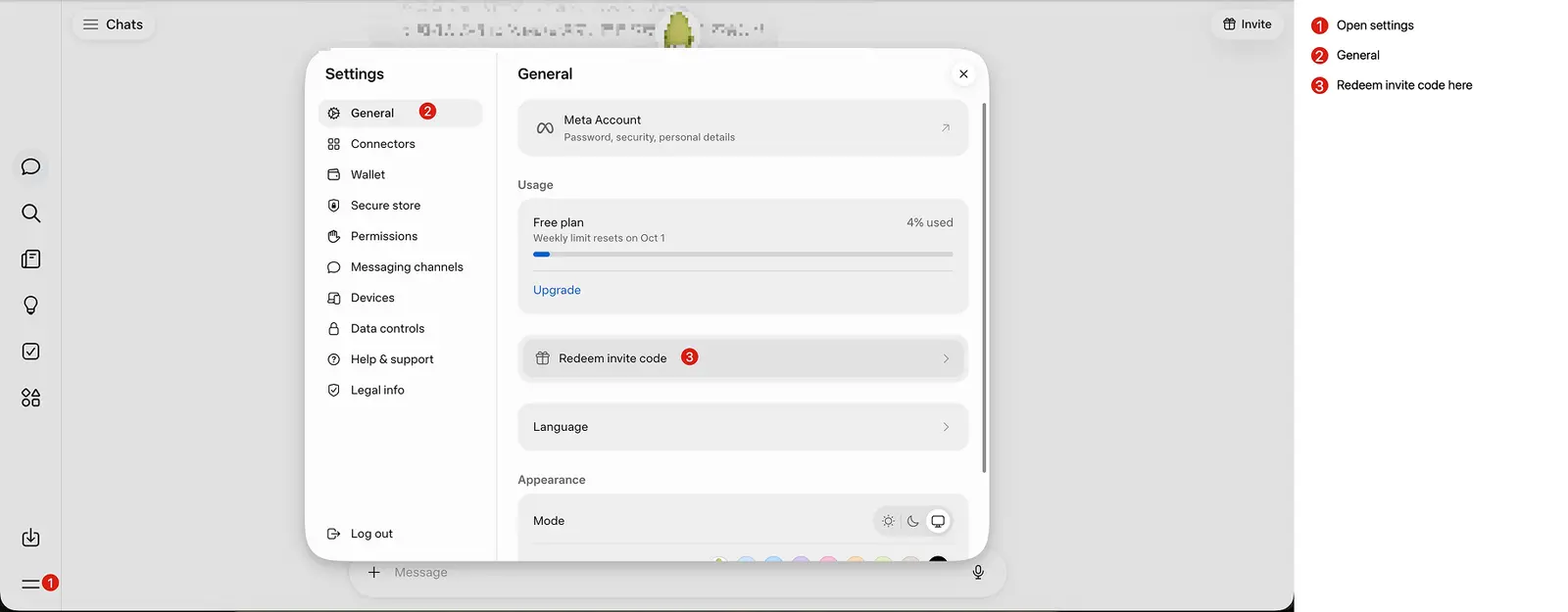
  2. 2Within 48 hours of signing up, open Settings → General → Redeem invite code. On the web, Settings is in the ☰ menu at the bottom-left; in the iPhone app the option is called “Redeem referral code”.
  3. 3Paste the 6-character code and confirm. You and the person who shared the code each get 1 billion Muse tokens.
Muse on the web: open the menu at the bottom-left, choose General in Settings, then click Redeem invite code.
Where to redeem on the web: ☰ menu → General → Redeem invite code. Tap the image to enlarge.

Then come back and vote on the code, so the next person knows whether it still works.

Why isn't my invite code working?
  • The code is used up. Each code can only be redeemed a limited number of times, so popular codes run out fast. Try one near the top of the list or one that was shared recently.
  • Your 48-hour window has passed. Codes can only be redeemed within 48 hours of creating your account, and the window can't be extended.
  • Muse isn't available in your region yet. Muse is only open in some countries (such as the US), and invite codes can't get you around that.
  • A typo. Codes are easy to mistype (0 vs O, 1 vs I). Use the Copy button instead of typing.

If a code fails because it's used up, give it a thumbs down. Codes with lots of thumbs down are hidden automatically.

How do I get my own invite code?

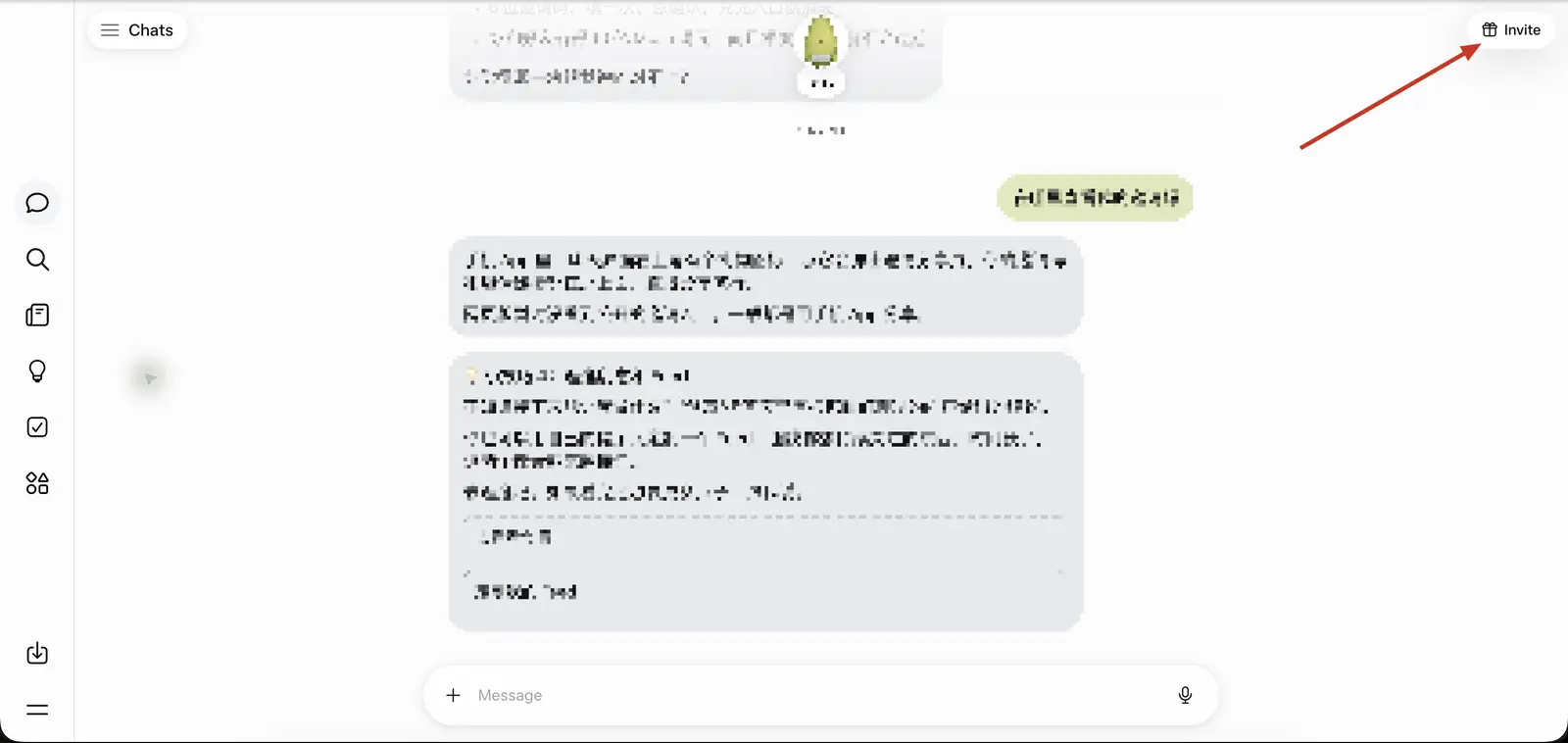
Once you have a Muse account, tap the Invite (gift) button in the top-right corner of the app to see your personal code. Every time someone redeems it, you get another 1 billion Muse tokens.

The Invite button with a gift icon in the top-right corner of Muse.
The Invite button in the top-right corner of Muse. Tap the image to enlarge.

Share it here with the form above, so people who need a code can find it.

How are codes ranked?
  • Votes and freshness. Each code's thumbs up minus thumbs down is weighed against how long ago it was shared. Codes only work a limited number of times, so a fresh, well-rated code ranks above an old one that is probably used up.
  • Bad codes sink. Codes with lots of thumbs down are hidden automatically.
  • One vote per person. You get one vote per code — click again to undo it.
  • Protected submissions. Every new code passes a human-verification check and is rate limited.